


Joi - Live Video Chat
4.44.64K Reviews
App Specs
- Version
- 2.7.0.2
- Updated On
- License
- Free
- Downloads
- 10,000,000+
- Developer
- VLMedia A.Ş.
- Categories
- Social
- Platform
- Android, iOS
Screenshots


 Analysis by AppCompare
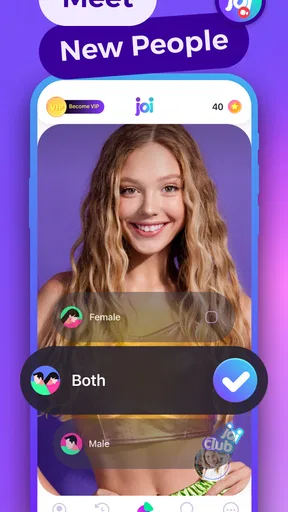
I approached Joi - Live Video Chat as a social app for people who want conversation to begin quickly rather than through a carefully built profile. Its central idea is simple: connect with unfamiliar people through live video and random calls, then decide in the moment whether the exchange is worth continuing. That makes the quality of the experience depend on more than the interface. Your connection, surroundings, patience, and ability to handle unexpected conversations all matter.
After spending time with it, my view is that Joi works best as a spontaneous way to meet people when you are comfortable with uncertainty. It is less suitable if you want a calm, fully controlled social network, a permanent community, or text-first communication. The app is free to download and use at its basic level, although optional purchases range from fifty cents to $189.99 per item, so I would pay attention to every purchase screen rather than treating “free” as the whole cost picture.
How Joi feels when the connection is good
The strongest moments come when a call starts quickly, both people have a stable connection, and neither participant is trying to force the conversation. Video changes the tone immediately. A short greeting can tell you more than a long profile, but it also removes some of the distance that makes text chat comfortable. I found the app more engaging when I treated each call as a brief social encounter instead of expecting every match to become a friendship.
That distinction is important. Random video chat is not the same as joining a group with shared interests. You may meet someone talkative, someone who ends the call immediately, or someone whose communication style simply does not suit you. The app’s appeal is the surprise, but surprise also creates inconsistency. If you need predictable conversations, a messaging app with contacts you already know will probably serve you better.
Joi is published by VLMedia A.Ş. and sits in the social category. Its public reception is strong, with a 4.4 average from around 92 thousand ratings and more than 10 million installs. Those figures suggest that the concept has found a broad audience, but they should not be mistaken for a promise that every call will be enjoyable. A large user base can improve the chance of finding an active conversation while also making the experience feel uneven from one session to the next.
Why network quality changes the whole mood
In a video-first app, a weak connection is not a minor inconvenience. It can turn a natural introduction into a sequence of delays, frozen images, broken audio, or awkward repetition. When the picture and sound stay in sync, I can focus on the person. When they do not, I start concentrating on whether the call will survive, which makes the interaction feel more mechanical.
This is why I would use Joi on a reliable Wi-Fi connection whenever possible, especially if I planned to spend more than a few minutes in the app. A strong mobile signal can be perfectly usable, but signal bars do not always tell the full story. Congestion, movement, and switching between network conditions can interrupt a live call at exactly the wrong moment. If you are sitting in a busy station or moving between streets, expect a less consistent experience than you would get in a stable room.
Worth Reading Before You Choose

Flipboard Shows What News Apps Must Do Beyond the Feed

Switching to Android Auto Means Rethinking Your Driving Routine

Google Calendar Makes a Crowded Week Easier to Manage

Ludo King Makes the Most of the Minutes Between Plans

Baby Panda World Brings Quick Play to Modern Phones, but Its Game Library Feels Busy

ESPN’s Live Game View Makes Following Close Games Easier
One practical habit helped me: I would not begin a call while doing something that required immediate attention. Video conversations need enough focus to notice whether the other person can hear you and whether the exchange is comfortable. Starting a call while walking, commuting, or carrying bags may seem convenient, but a sudden network change or a distracting environment can make you appear disengaged even when the real problem is technical.
Using it in ordinary mobile situations
The app is naturally suited to short sessions. I could imagine opening it during a quiet break at home, after finishing a routine task, or when I wanted a social change of pace without arranging a meeting in advance. It is less convincing as a background activity. Unlike a text feed, a live video conversation asks for attention from the first second, and the person on the other side can see when yours is elsewhere.
Your surroundings matter more than they would in ordinary messaging. A bright, reasonably quiet place makes the interaction easier for both people. A crowded café, a windy street, or a room with other people moving behind you can create distractions that neither participant can solve through the app. I would also avoid using it where a private conversation could be overheard or where showing your surroundings might reveal more than you intended.
That leads to a useful boundary: Joi can help fill a social gap, but it should not replace judgment. I would keep personal details general at the beginning, avoid showing identifiable documents or private spaces, and end a call as soon as it feels uncomfortable. The live format can create a false sense of familiarity because facial expressions arrive immediately. A friendly conversation is still an interaction with a stranger.
What happens when a call fails
Failure recovery is one of the most important parts of this kind of service. A call can fail because of the network, a participant leaving, a device issue, or simple incompatibility between two people. The right response is not to keep forcing the same conversation. If audio becomes unreliable, I would first check whether the problem is local: move to a steadier location, pause other demanding activity, and try again only if the situation improves.
If the other participant disappears or the exchange becomes uncomfortable, moving on is usually the better choice. Random matching works because the next interaction does not need to carry the weight of the previous one. I found that the app feels much less frustrating when I accept that some calls are disposable introductions rather than failed friendships.
There is also a psychological recovery step. A poor call can make the next one feel suspicious before it begins, while an unusually good call can make you expect too much from the next person. I recommend judging each interaction independently. The app is built around variation, so keeping expectations modest makes its strengths easier to enjoy.
For users who are sensitive to interruptions, this is a real limitation rather than a small annoyance. Joi does not have the same predictability as contacting a friend who is already in your address book. If your priority is dependable communication, a conventional messenger or scheduled video service is the better choice. Joi is for discovery, not reliability.
Keeping mobile data and spending under control
Live video can consume a meaningful amount of mobile data compared with text chat, even when a session feels short. I would start with Wi-Fi, monitor how long I stay in a call, and avoid opening the app casually when my data allowance is nearly used. People often focus on the purchase price and forget that repeated video sessions can also affect their phone bill through data use.
The free entry point is helpful because it lets you decide whether random video conversation suits your personality before committing money. Still, optional in-app items can cost from $0.50 to $189.99 each. That is a wide range, and it makes deliberate purchasing especially important. I would never buy something simply because a conversation was exciting or because I wanted to improve a disappointing session. Take a moment to understand what is being offered and whether it changes the experience in a way you genuinely want.
A good personal rule is to test the basic experience across several short sessions before considering any purchase. That reveals whether your main problem is matching, connection quality, conversation style, or simply the fact that live random chat is not for you. Spending cannot solve all four. In particular, it cannot guarantee chemistry with another person.
Joi is rated Mature 17+, which fits the nature of live conversations with strangers. I would treat that rating as a reminder about the environment, not as a substitute for personal safety. Younger users should not use it if they do not meet the applicable age requirement, and adults should still use blocking, reporting, and privacy judgment whenever an interaction crosses a line. I would also avoid moving a conversation to another service immediately just because someone seems friendly.
Who will enjoy it, and who should choose something else
I think Joi is a good fit for someone who enjoys meeting unfamiliar people, can tolerate quick endings, and prefers seeing and hearing a person instead of exchanging only messages. It can be useful when you want a brief social encounter without organizing a group, building a detailed profile, or waiting for someone you already know to become available.
It is also a reasonable option for people who understand that the first few calls are part of the filtering process. The app rewards curiosity and emotional flexibility. If you can politely end an uninteresting conversation and start another without taking it personally, the random format becomes much more enjoyable.
I would skip it if you dislike appearing on camera, need strong control over who contacts you, or become stressed by unpredictable social behavior. It is not my first recommendation for serious dating, professional networking, language study that requires a structured curriculum, or private conversations with trusted contacts. Those goals are better served by services designed around profiles, scheduled meetings, moderated communities, or existing relationships.
Compared with ordinary messaging apps, Joi offers immediacy and a stronger sense of presence, but gives you less control and less time to think. Compared with established video meeting tools, it is more spontaneous but less dependable for planned communication. Compared with interest-based communities, it may create faster contact but provides less built-in context before the camera turns on. That trade-off defines the product more clearly than any feature list.
Small habits that make the experience better
I would begin with a short opening that gives the other person an easy way to respond. A simple greeting and a neutral question work better than expecting instant intimacy. If the conversation stalls, do not interpret that as a technical failure or a personal judgment. Sometimes the match is simply not a match.
Another useful habit is to decide your boundaries before opening the app. Know which subjects you will avoid, how much of your background you are comfortable showing, and when you will end a call. Making those decisions in advance is easier than improvising while a stranger is watching and asking questions.
I would also use the app in a location where I can leave without disturbing anyone. That sounds obvious, but it changes how confidently you respond. If you are worried about a roommate, a colleague, traffic, or noise, you are less likely to notice whether the interaction is respectful. A private, controlled setting improves both safety and conversation quality.
Finally, I would treat connection troubleshooting as a quick check rather than a long project. If several calls are unstable in the same place, change location or network before blaming the matching experience. If calls are technically clear but consistently unpleasant, the issue may be the format itself. Recognizing that difference can save both time and money.
What the current app details mean for an installation
Joi was released on February 24, 2020, and the current version is 2.7.0.2. It supports devices running Android 6.0 or later. That makes the minimum operating-system requirement relatively accessible for people using older compatible phones, although a supported system alone does not guarantee a comfortable video experience. Camera quality, microphone condition, battery health, and network stability will all shape the result.
Because this is a live social app, I would install it only on a device I am comfortable using for camera conversations. Before starting, I would check the camera framing, microphone behavior, notification interruptions, and available battery. A phone that handles ordinary messaging well may still struggle when video, audio, and changing network conditions are active together.
The app’s mature positioning also means I would discuss expectations with anyone sharing the device or account. This is not something I would hand to a child as a harmless way to pass time. The random nature of the conversations means that responsible use depends heavily on the user’s own choices during each interaction.
My connectivity verdict
Joi succeeds when its spontaneity is the point. I like that it can move from idle time to a real-time conversation without requiring a long setup, and I appreciate the sense of presence that video provides when the connection behaves. The broad audience and strong average rating show that many people find value in this style of social discovery, while the free starting point makes experimentation straightforward.
At the same time, the app asks you to accept instability in several forms: unstable connections, unpredictable conversations, uneven privacy comfort, and optional spending that can become substantial. None of those makes it a bad app, but they do mean that the best user is someone who stays alert and keeps expectations realistic.
My recommendation is to try it during a short, low-pressure session on a dependable connection, with mobile data and purchases under control. If you enjoy the quick rhythm of meeting strangers and can leave unproductive calls behind, Joi may become an entertaining social outlet. If you want dependable contact, carefully chosen communities, or conversations that develop at your own pace, I would choose a more structured alternative instead.
In the end, Joi is most convincing as a doorway to brief human contact, not as a complete replacement for the social tools you already use. Its success depends on the network beneath it and the boundaries you bring to it. Used with those realities in mind, it offers a distinctive way to connect; used without them, the same spontaneity can quickly feel like friction.
Pros
- Quickly connects you with people for spontaneous video conversations.
- Simple interface makes starting a live chat easy for new users.
- Live interactions feel more personal than text-based social apps.
- Useful filters and matching options help refine potential connections.
- Available on mobile
- making conversations convenient while traveling.
Cons
- Some features may require in-app purchases or paid credits.
- Video quality can vary significantly with weaker mobile connections.
- You may encounter inactive
- unsuitable
- or low-effort user profiles.
- Public video chats can raise privacy concerns if used carelessly.
- Frequent notifications may become distracting without notification controls.
FAQs for Joi - Live Video Chat
What is Joi - Live Video Chat, and how does it work?
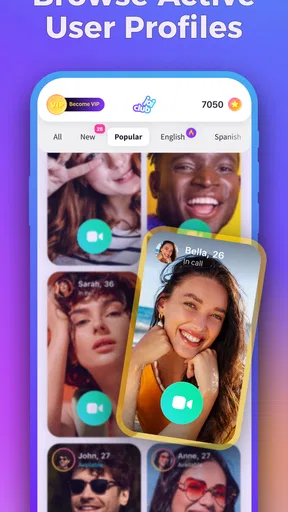
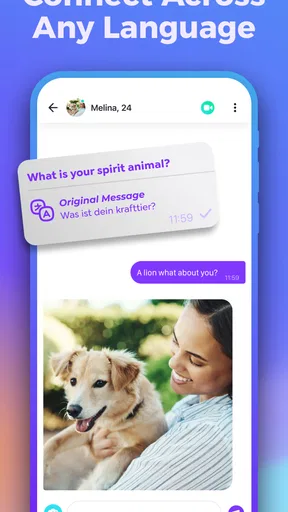
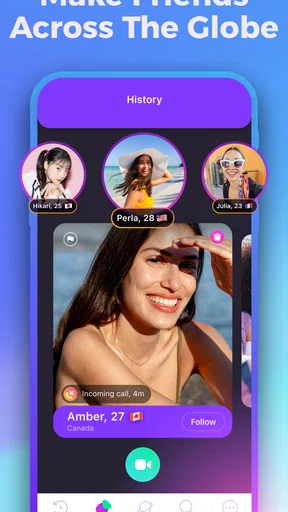
Joi - Live Video Chat is a social communication app designed for meeting and talking with people through live video interactions. After creating an account, users can browse available profiles or suggested contacts, start conversations, and use video or messaging features depending on the other person’s availability. The experience is focused on spontaneous social discovery rather than traditional text-only messaging.
Is Joi - Live Video Chat free to download and use?
The app can generally be downloaded for free, but some communication, discovery, or premium interaction features may require in-app purchases, credits, or a subscription. The exact pricing and available options can vary by region and platform. Before using paid features, check the app’s current purchase screen carefully, including recurring billing details, cancellation rules, and whether credits are refundable.
Is Joi - Live Video Chat safe for meeting strangers online?
Joi includes a social environment where users may interact with people they do not know, so caution is important. Avoid sharing your address, phone number, passwords, financial information, or private documents. Use blocking and reporting tools when necessary, and end conversations that feel uncomfortable. Parents should also be aware that the app may not be suitable for younger users without appropriate supervision.
Does Joi require access to the camera, microphone, or personal information?
Video conversations normally require access to the device camera and microphone, while account creation may involve information such as an email address, phone number, profile details, or login credentials. You can review and manage these permissions through your Android or iOS settings. Only grant access that is necessary for the features you intend to use, and read the app’s privacy policy before creating a detailed public profile.
What should I do if I experience inappropriate behavior, technical problems, or unwanted charges?
If another user behaves abusively, sends inappropriate content, or appears suspicious, stop communicating and use Joi’s report and block options. For crashes, connection problems, or missing features, update the app, check your internet connection, and contact official support. If you notice an unexpected purchase, review your Google Play or App Store receipt and request assistance through the relevant platform’s billing process.


